Selective Call Acceptance for Advantage Voice (Unison)
What is Selective Call Acceptance?
Selective Call Acceptance (SCA) is a feature available in Advantage Voice (formerly Rogers Unison) that lets administrators control which incoming calls are allowed to reach a particular office line or device.To permit calls from specific numbers or a designated contact list, administrators activate this feature and then create a whitelist by adding those approved phone numbers or contacts to the list. Only calls from the numbers or contacts included on this whitelist will be connected. Any calls from numbers not on the list are either blocked or redirected and the caller receives a message stating that the recipient is not accepting calls at this time.
How do I create a whitelist and restrict incoming calls to specific subscribers or associated devices?
To create a whitelist, follow these steps:If you haven't signed into your account yet:
- Go to MyBusiness Hub sign-in page.
- Select Sign in.
- Enter your username and password.
Once you’re signed in:
- Select Go to RogersUnison.
- Select User Management.
- Select User Call Settings.
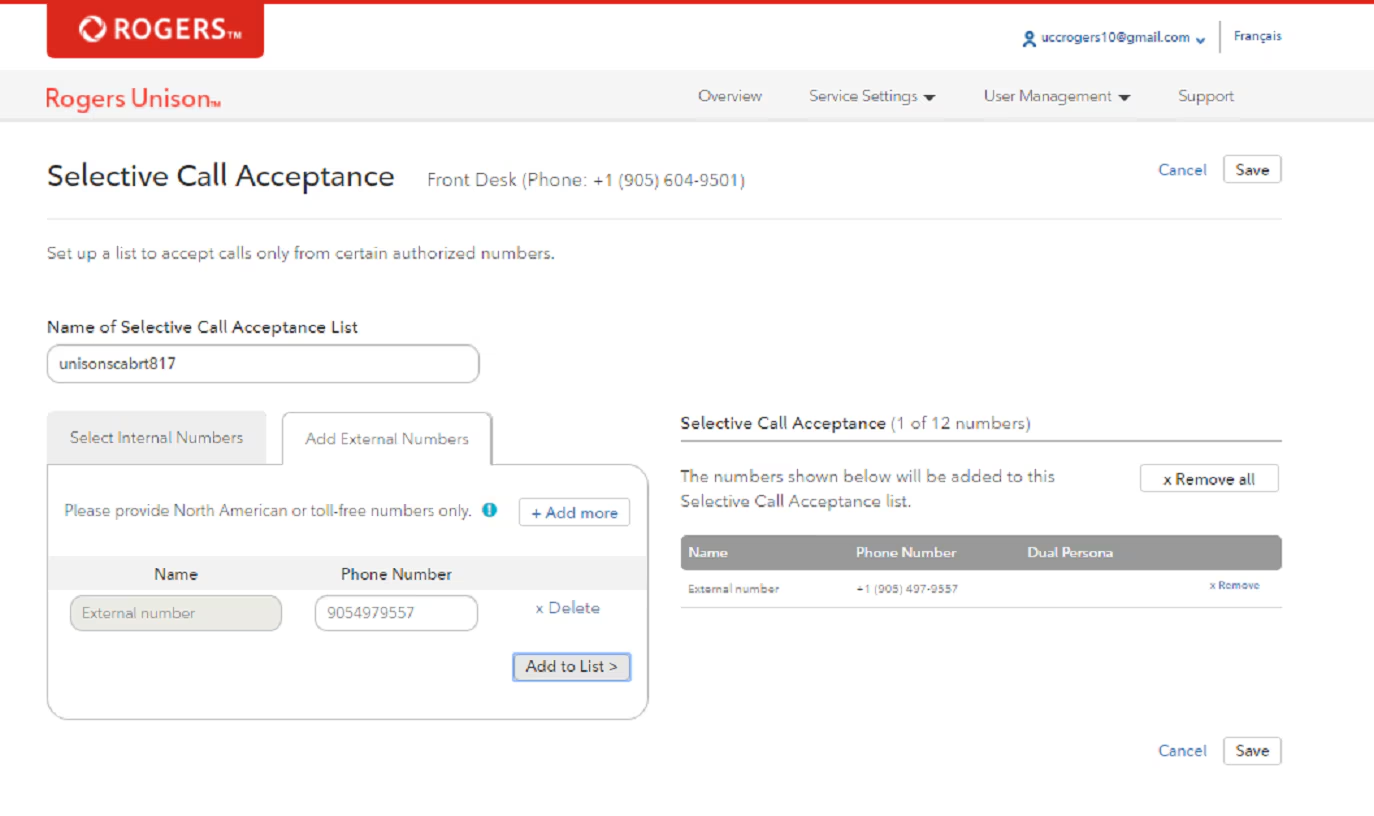
- Select Set up Selective Call Acceptance.
- Create a list by entering a name.
- Select internal and external numbers you want on the list.
- Select Remove or Remove All to delete any or all numbers.
- Select Save.