Managing User Access to Advantage Voice
A quick guide to configuring and controlling user permissions.

User access
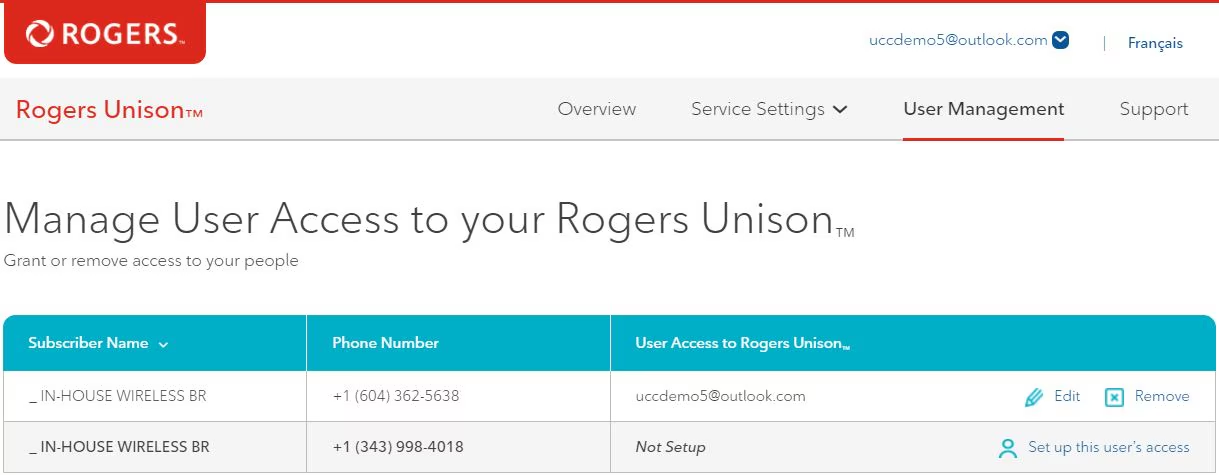
To give users access to Advantage Voice, select Set Up User Access for the relevant subscriber on the admin dashboard.
You can also modify the status or details of any of the subscribers by selecting Edit or Remove.To add employees who need access to Advantage Voice but aren’t yet associated with your Rogers Business Account, call Rogers at 1-866-727-2141.
- Go to the Manage User Extension, Phone and Call Settings page on the admin dashboard.
- Search for or select the relevant user.
- Select View Details to set up their extension and primary profile settings
To manage user settings as an administrator:
- Select User Management
- Select User Call Settings.
- Select View Details of relevant user.
- Select User Management
- Select My Call Settings for features like:
- 9-1-1 Emergency Address Management
- Do Not Disturb (including scheduling)
- Show My Caller ID
- Dual Persona
- Call Waiting
- Forward My Calls (including scheduling)
- Ring My Numbers