

Learn about the charges that may appear on your Rogers bill for wireless and mobile services. For online billing, Rogers Xfinity billing, your wireless home internet bill or general billing details, visit our Billing page.
Viewing your bill
View your latest bill through MyRogers or MyRogers (Shaw) account.
View your bill on rogers.com
- Sign in to MyRogers.
- Select Billing & Payment from the home screen.
View your bill on the MyRogers app
- Open the app and sign in.
- Select View Bill.
- If you don't see View Bill on your home screen, tap the icon and select Sign In.
- Once signed in, tap View Bill.
View your Rogers together with Shaw bill
- Sign in to MyRogers (Shaw).
- Select My Bills.
- Your last month of bills will display under your current balance.
- Select View my bill for a detailed breakdown.
- Review page 2 of your bill for a detailed version of the Current Monthly Services section. Note any promotional line items.
First bill fees or charges
This section applies if you've activated services or upgraded your device (phones, smartphones, tablets and Wireless Home Phone).
Partial charges for two date ranges
Rogers bills one month in advance, so your first bill may include partial charges for two date ranges: One from your service activation date to the billing date, and another for your next full billing cycle.
Here's an example:
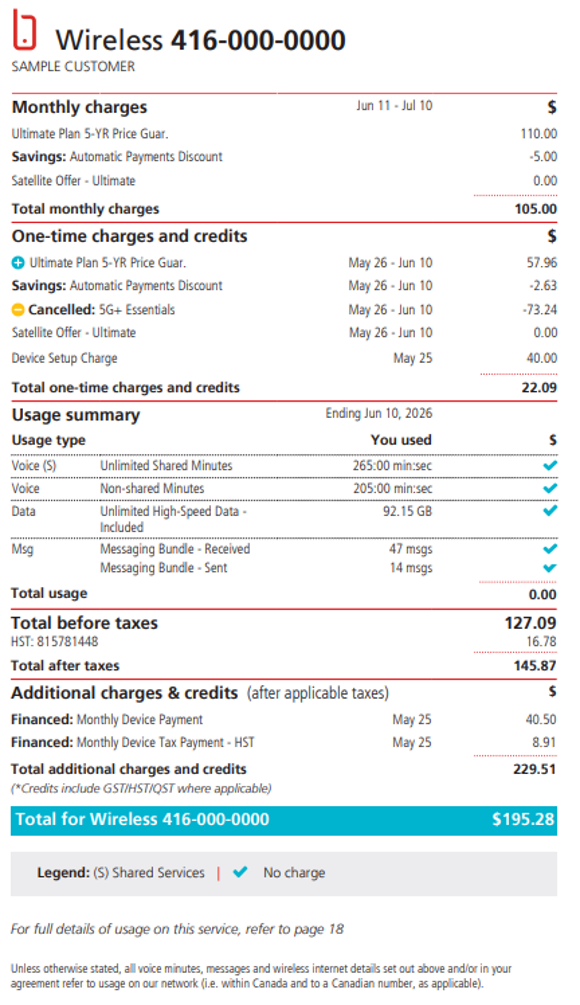
If the billing cycle end date is July 10, your monthly charge ($110.00 for an Ultimate Plan 5-YR Price Guarantee) will include services for July 11 to August 10.
Since new services were added on May 26, you'll also see one-time charges on your bill. For example, you'll be charged for services from May 26 to May 31 (6 days at $110 ÷ 31 x 6 = $21.29032) and June 1 to June 10 (10 days at $110 ÷ 30 x 10 = $36.667). That's a total prorated charge of $57.96
These are known as partial charges. You'll find them in the One-time Charges and Credits section of your bill.
Changing your mobile plan
If you change your phone plan during your billing cycle, you’ll pay part of the cost for your new plan. Rogers bills 1 month ahead. Here's what to expect:
- Under the One-time charges and credits bill section, there will be partial charges for your new mobile plan that covers the time between the activation date of your services and the billing date.
- There will also be a credit labeled Cancelled to show that your old phone plan has been cancelled.
The monthly charges for your new phone plan will be listed in the monthly charges section.
Understanding your first bill: Rogers together with Shaw
View bills, set up auto payments or online billing and view your current bill using the MyRogers (Shaw) app.
Your first bill will include:
- Your account: a unique number that is linked to your main account.
- Invoice date: date this invoice was issued.
- Due date: the last day you can pay your balance without paying any extra fees.
- Summary of your account: all the charges and payments made on your account for your services.
- One-time fees: for charges charged only once. Examples include one-time add-ons or down payments.
- Current charges: charges incurred for your current month of service.
- Details of current charges: an item-by-item breakdown of all services and purchases made on your account, including any current promotions.
When you get your first bill, it'll be for the current month of service. Your payment is required 21 days after your bill was created and sent to you. Any extra charges from that month, like long-distance charges, will be added to your next bill.
Roam Like Home and travel
Travelling? Get information about mobile charges when using your device while outside of Canada.
Roam Like Home charges for mobile phones and tablets
If you travel outside Canada, Roam Like Home lets you use your phone in 185+ countries for a low daily fee. This means you pay less while you're travelling abroad to a Roam Like Home country.
- If you’re on an eligible monthly plan* and use Roam Like Home while travelling abroad, there will be a Roam Like Home charge under the One-time charges and credits section for each day you’ve used the service.
- If you have more than one device under your mobile plan and you use one or more of these devices abroad, be aware that the daily Roam Like Home charge applies to each device used in a Roam Like Home destination, which is why you can have Roam Like Home charges under multiple lines.
- If you’re not on an eligible plan and use your phone while you're travelling abroad, you'll pay for each use. For more information on roaming, check out our Roam Like Home and roaming support page.
*Excludes most enterprise plans, as well as monthly plans that include roaming services.
Pay-per-use rates while enrolled in Roam Like Home
Even if your plan is eligible for Roam Like Home, you can still be charged pay-per-use rates in these cases:
- You’ve visited an ineligible Roam Like Home destination.
- You’ve exceeded the allotted usage amounts (talk, text and data) on your monthly wireless plan while visiting a Roam Like Home country. You’ll be charged the overage rate applicable to your plan.
Check out our Roam Like Home page for more information.
Usage-based charges
Learn about charges related to data usage, long-distance calling and text messages (SMS).
Data overage charges
If you’re on a mobile plan that doesn’t offer unlimited data and go over the data limit within your billing cycle, there will be a Total Charge for Data Overage under Usage Summary to cover each GB over your set limit.
Check out our tips to manage your mobile data usage and learn how to avoid data overage charges.
Always going over your mobile data limit? Consider getting a monthly data add-on or switching your plan. Check out our latest plans for more information.
Charges for buying a data top-up
After you buy a monthly data add-on you’ll have a Data Top-Up charge under the Monthly charges section of your next bill, along with the amount of additional data you’ve added in Gigabytes (GB) or Megabytes (MB).
To confirm the exact amount of the monthly data add-on that you’ve used, search for Data Top-Up under Usage Summary.
Check out our Monthly Data Add-on support article for more information.
How long-distance charges work
You'll be charged for long distance in the following cases:
Domestic long distance (calls within Canada)
Incoming calls:
- Receiving a call while outside your local calling area is long distance.
- All calls you receive on your wireless device while you're within your local calling area are local.
Outgoing calls:
Calling another Canadian number outside your local calling area is domestic long distance.
International long distance (calls outside Canada)
Outgoing calls:
Calling someone outside Canada is international long distance.
Incoming calls:
- If you receive a long-distance call while within your local calling area, you won't be charged for long distance.
- If you receive a long-distance call while outside your local calling area, it's long distance.
If your plan includes Canada-Wide minutes, you can call any other Canadian number and receive a call from anywhere in Canada using your minutes without long-distance charges.
Long-distance charges appear in the Usage summary section of your bill. If your wireless plan has Unlimited Canada-Wide Minutes, you won't be charged for making or receiving calls while in Canada (you won't be charged for domestic long-distance calling).
For more information on long-distance charges, check out our Long-distance Add-ons page for ways to get lower long-distance rates.
Long-distance charges after buying an add-on
After buying a Long-Distance Add-on, note that not all countries have preferred rates. For the countries with preferred rates, those rates vary. For more information on Long Distance charges, visit the Long Distance Add-ons page, select Long Distance Rates by Country, and type in the country for which you’d like to check long-distance rates.
Charges for SMS usage
Most plans include unlimited texting, and picture/video messaging within Canada (received and sent messages). In the following cases, there will be extra charges for SMS/MMS usage in the Usage summary section:
- If you don’t have a messaging bundle plan for sent domestic or international messages, pay-per-use domestic/international rates will apply.
- If you’re on a wireless plan that isn’t eligible for Roam Like Home, or you’re travelling to a destination that isn’t eligible for Roam Like Home, and you send messages while abroad, pay-per-use roaming rates will apply.
Follow these tips to reduce SMS/MMS usage charges:
- Consider getting a long-distance add-on if you send a lot of international text/multimedia messages.
- Take advantage of Roam Like Home if you’re planning on sending text/multimedia messages while travelling.
Charges in the Third-Party Charges section
You can make third-party digital purchases — like games, videos, eBooks, and apps — and bill them directly to your Rogers wireless bill. It's a convenient way to buy digitally without sharing your credit card with third-party services. Google Play Store supports Rogers billing.
To use this, you'll need to enable Rogers as your payment method — it doesn't happen automatically. You can also pay with a credit card instead.
These charges appear as Third-Party & Other Rogers Charges under the Usage summary section. For a detailed breakdown, check the Details of Third-Party & Other Rogers Charges table after the Wireless page.
Charges for adding Wireless Home Phone to your plan
Rogers Wireless Home Phone lets you make residential calls by connecting your home phone to the Rogers wireless network. Getting Wireless Home Phone is like subscribing to a wireless plan. In terms of billing, here’s what to expect:
- When you get your first bill, note that Rogers bills you 1 month in advance. There will be partial charges from the date you’ve activated the Wireless Home Phone service to the billing date. Check out partial charges for more information.
- Under the Monthly Charges section, you’ll be able to view the monthly service fee for your Wireless Home Phone plan.
- All Wireless Home Phone plans include Canada-wide calling. If you add a long-distance add-on, you may have a monthly charge for your add-on under Monthly charges section.
- If you’ve bought the Wireless Home Phone device in full, Rogers charges a one-time fee to cover the cost of the device. There is no one-time Connection Fee, but you’ll still have monthly provincial 9-1-1 fees.
If you cancel your term Wireless Home Phone service and you’ve received a $0 Wireless Home Phone device at the time of activation, Rogers charges an Early Cancellation Fee as set out in your service agreement.
For more information on charges, check out our Wireless Home Phone page.